Supabase Postgres CDC
Stream Supabase Postgres changes into RawTree with logical replication and the supabase/etl worker.
Supabase Postgres CDC
This example streams a Supabase Postgres table into RawTree with Change Data Capture.
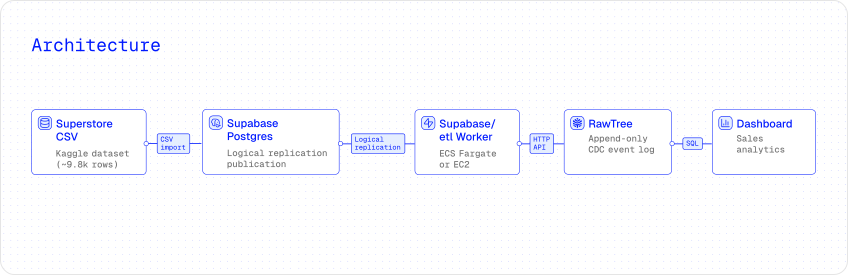 It imports the Kaggle Superstore Sales dataset into Supabase, publishes the table through logical replication, and runs a
 supabase/etl worker that lands the initial copy plus inserts, updates, and deletes in an append-only RawTree table.
The walkthrough uses the Kaggle Superstore Sales dataset as sample data. Use the Showroom version for the curated dashboard and live walkthrough.
What this demonstrates
- Initial copy plus live CDC from Supabase Postgres.
- Append-only event storage in RawTree.
- Terraform-managed deployment to ECS Fargate.
- A build-from-source path for understanding and debugging the worker.
- Dashboard queries that reconstruct the latest table state from CDC events.
1. Prepare the source table in Supabase
Create a Supabase project and import the Superstore Sales CSV through Table Editor → New table → Import data from CSV. Name the table superstore_sales_data in the public schema.
Supabase preserves the CSV column names verbatim, including spaces such as Row ID and Order ID.
Enable logical replication for the table:
-- REPLICA IDENTITY FULL makes UPDATEs and DELETEs include the full old row,
-- which the worker needs to emit complete CDC events.
ALTER TABLE public.superstore_sales_data REPLICA IDENTITY FULL;

DROP PUBLICATION IF EXISTS rawtree_superstore_publication;
CREATE PUBLICATION rawtree_superstore_publication
FOR TABLE public.superstore_sales_data;
2. Get the connection URL and CA certificate
Copy the Direct connection string from Project Settings → Database → Connection string. Do not use the pooler URL; logical replication requires a direct replication connection.
Download the Supabase CA certificate from Project Settings → Database → SSL Configuration.
You can also dump the CA from the live TLS handshake:
host=db.<your-project-ref>.supabase.co
openssl s_client -showcerts -starttls postgres -connect "$host:5432" </dev/null 2>/dev/null \
  | awk '/-----BEGIN CERT/,/-----END CERT/' > ~/supabase-ca.crt
Supabase direct endpoints are commonly IPv6-only. If you deploy to ECS, use a dual-stack subnet so the worker can reach Supabase.
3. Configure credentials
Set RawTree credentials as environment variables. The AWS provider uses your default AWS credentials or AWS_PROFILE.
export RAWTREE_API_KEY="rt_..."
export RAWTREE_ORG="your-org"
export RAWTREE_PROJECT="your-project"

export TF_VAR_supabase_database_url='postgres://postgres:PASS@db.<ref>.supabase.co:5432/postgres?sslmode=require'
supabase/etl
supabase/etl is Supabase's Rust framework for Postgres logical-replication pipelines. It handles the initial copy, streams ongoing inserts, updates, and deletes, and lets destinations write those events wherever they need to go. See the supabase/etl documentation for the upstream project details.
4. Deploy with Terraform
A single rawtree_supabase_cdc_ingestion resource provisions the worker infrastructure: Secrets Manager, IAM, CloudWatch Logs, ECS cluster, and a long-running Fargate service.
terraform {
  required_providers {
    rawtree = { source = "rawtreedb/rawtree" }
    aws     = { source = "hashicorp/aws", version = "~> 5.0" }
  }
}

provider "rawtree" {}
provider "aws" { region = "us-east-1" }

variable "supabase_database_url" {
  type      = string
  sensitive = true
}

resource "rawtree_supabase_cdc_ingestion" "superstore" {
  name        = "superstore"
  region      = "us-east-1"
  publication = "rawtree_superstore_publication"

  # For production, prefer database_url_secret_arn and
  # tls_root_cert_secret_arn pointing at secrets you manage.
  # Those values never enter Terraform state.
  database_url      = var.supabase_database_url
  tls_root_cert_pem = file("~/supabase-ca.crt")

  subnet_ids       = [aws_subnet.this.id] # dual-stack subnet
  assign_public_ip = true                 # IPv4 for the ghcr.io image pull

  cpu    = 512
  memory = 1024
}

output "log_group_name" {
  value = rawtree_supabase_cdc_ingestion.superstore.log_group_name
}
5. Apply and verify
Apply the configuration and tail the worker logs. On first start, the worker copies the existing Superstore rows into public_superstore__sales__data, then streams live changes from the replication slot.
terraform init
terraform apply

aws logs tail $(terraform output -raw log_group_name) --follow

rtree query "SELECT count() FROM public_superstore__sales__data"
6. Open the dashboard
Create a read-only API key for the dashboard:
rtree key create --name superstore-dashboard --permission readThen open the Showroom dashboard. Insert, update, or delete rows in Supabase and watch the CDC operations update within seconds.